
My previous blog post was talking about what Matrix is and why you would like to move from Slack and Teams to Matrix. This blog post will talk about my installation journey.
The normal path of installing Matrix is to deploy it on a Kubernetes cluster. This makes a lot of sense because you need 4-5 services in total to get it running. However, when I was looking up the Azure Kubernetes Service costs it would cost me about $100 per month and I was not willing to spend that much on this experiment. So I played with the idea of deploying on Azure App Service Plan instead.
High Level Architecture
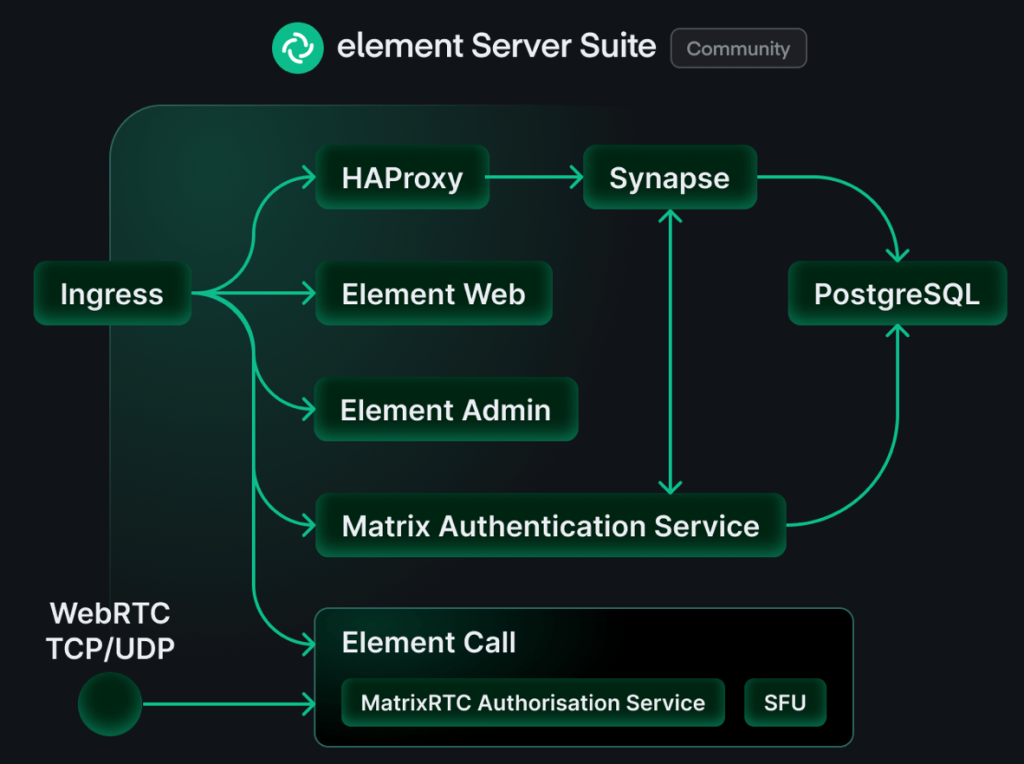
Here’s a high level image of the components of a Matrix system.
Synapse
This is the home server and it’s the core Matrix service. This one is responsible for routing all messages to the correct recipient and such. All the core functionality is here. It’s also the server that you connect your clients to.
Element Web
This is a web client for Matrix. Think of it as Slack in the web browser. This one is not really needed for the system to work, but I found it useful to setup as a way to test the system. Later I used Element desktop client and Element X iOS client exclusively.
Matrix Authentication Service (MAS)
This is where you create users and authenticate. This is absolutely needed and Synapse and MAS need to be integrated with one another to work properly.
PostgreSQL
It is possible to run Matrix on a file database like SQLite, but I don’t think it’s viable for a production setup. I did setup my own PostgreSQL and connected it to Matrix. More on that down below.
Element Call
I didn’t expect to be using audio or video conferencing in my experiment so I didn’t setup Element Call, but I think this is essential in a production setup.
Ingress
I thought I could manage without a dedicated ingress, but it became weird because my home server name and the address became different. My home server name was matrix.klabbet.dev but the address was synapse.matrix.klabbet.dev. I think setting up a dedicated nginx for ingress would have made much difference and I don’t think it would have been particularly hard neither.
Azure Architecture
Deciding to deploy Matrix on Azure to avoid Microsoft training AI on your data, or to become independent from Microsoft dominance with Teams, might seem to contradict the purpose – but the purpose here was to explore Matrix. If the goal was to reduce dependency to Microsoft I would’ve chosen a different hosting option.
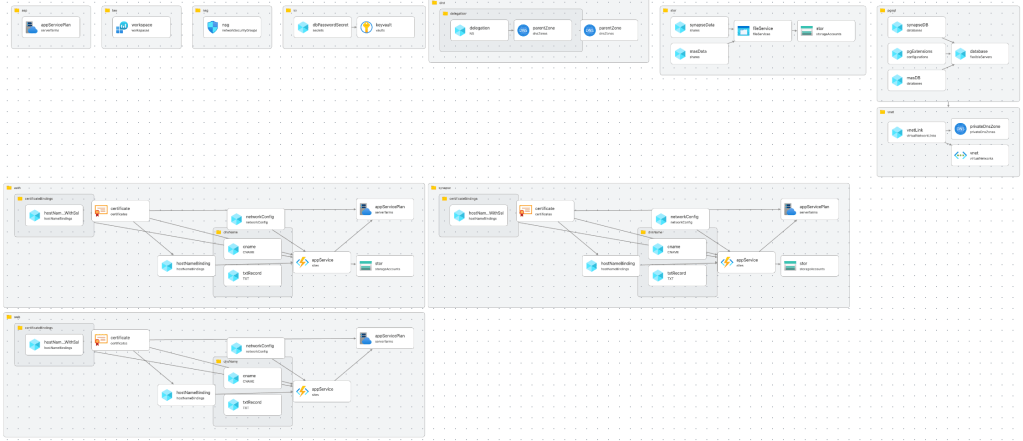
I will summarize the most important parts of the installation here. If you want the details you can find all the bicep scripts on my public repository on Github.
Virtual Network
First of all you need a virtual network to protect your storage account, key vault and the database. All communication from your app to these services must be private.
resource vnet 'Microsoft.Network/virtualNetworks@2025-01-01' = {
  name: 'vnet-klabbet-matrix-prod-001'
  location: resourceGroup().location
  tags: resourceGroup().tags
  properties: {
    addressSpace: {
      addressPrefixes: [
        '10.100.0.0/16'
      ]
    }
    subnets: [
      {
        name: 'snet-klabbet-matrix-prod-001'
        properties: {
          // 10.100.0.0 - 10.100.0.255
          addressPrefix: '10.100.0.0/24'
          networkSecurityGroup: {
            id: resourceId('Microsoft.Network/networkSecurityGroups', 'nsg-klabbet-matrix-prod-001')
          }
          serviceEndpoints: [
            {
              service: 'Microsoft.Storage'
            }
            {
              service: 'Microsoft.KeyVault'
            }
          ]
          delegations: [
            {
              name: 'Microsoft.Web.serverFarms'
              properties: {
                serviceName: 'Microsoft.Web/serverFarms'
              }
              type: 'Microsoft.Network/availableDelegations'
            }
          ]
        }
      }
      {
        name: 'snet-klabbet-matrixdb-prod-001'
        properties: {
          // 10.100.1.0 - 10.100.1.255
          addressPrefix: '10.100.1.0/24'
          networkSecurityGroup: {
            id: resourceId('Microsoft.Network/networkSecurityGroups', 'nsg-klabbet-matrix-prod-001')
          }
          delegations: [
            {
              name: 'Microsoft.DBforPostgreSQL.flexibleServers'
              properties: {
                serviceName: 'Microsoft.DBforPostgreSQL/flexibleServers'
              }
            }
          ]
        }
      }
    ]
  }
}
There are two subnets, one for the service, key vault and storage. The second subnet is for the database because it needs a delegation. It’s a bit overkill to use a /16 address space for the vnet and /24 for the subnets. You can without any trouble squeeze in everything into a much smaller address space. (just me being lazy)
You need to create a private DNS zone to link to your database.
resource privateDnsZone 'Microsoft.Network/privateDnsZones@2020-06-01' = {
  name: 'private.postgres.database.azure.com'
  location: 'global'
  tags: resourceGroup().tags
}

// Link the Private DNS Zone to your VNet
resource vnetLink 'Microsoft.Network/privateDnsZones/virtualNetworkLinks@2020-06-01' = {
  parent: privateDnsZone
  name: 'vnet-klabbet-matrix-prod-001-link'
  location: 'global'
  properties: {
    registrationEnabled: false
    virtualNetwork: {
      id: vnet.id
    }
  }
}
Storage Account
Synapse needs a storage account where it can store temporary files and media. I like Azure Storage Accounts because they’re so cheap. Here we create a file service for synapse data and MAS.
MAS will only use it for the configuration file.
resource stor 'Microsoft.Storage/storageAccounts@2025-06-01' = {
  name: 'stklabbetmatrixprod001'
  location: resourceGroup().location
  tags: resourceGroup().tags
  sku: {
    name: 'Standard_LRS'
  }
  kind: 'StorageV2'
  properties: {
    networkAcls: {
      bypass: 'AzureServices'
      defaultAction: 'Deny'
      virtualNetworkRules: [
        {
          id: resourceId('klabbet-matrix-prod', 'Microsoft.Network/virtualNetworks/subnets', 'vnet-klabbet-matrix-prod-001', 'snet-klabbet-matrix-prod-001')
          action: 'Allow'
        }
      ]
    }
  }
}

resource fileService 'Microsoft.Storage/storageAccounts/fileServices@2025-06-01' = {
  parent: stor
  name: 'default'
}

resource synapseData 'Microsoft.Storage/storageAccounts/fileServices/shares@2025-06-01' = {
  parent: fileService
  name: 'synapse-data'
  properties: {
    accessTier: 'Hot'
  }
}

resource masData 'Microsoft.Storage/storageAccounts/fileServices/shares@2025-06-01' = {
  parent: fileService
  name: 'mas-data'
  properties: {
    accessTier: 'Hot'
  }
}
The network rule makes sure that you can only reach the data from within the subnet. Since the configuration files contains secrets, this is necessary.
I believe that it’s possible to replace the secrets in the config files with environment variables. In that case you could put the secrets in Azure Key Vault and have them injected when the service starts. This is worth exploring if running this in production.
PostgreSQL
I preferred setting up a hosted Azure Database for PostgreSQL. Partly because it’s much more performant than SQLite. You offload the application server a lot when you have a dedicated database. Also because you get some nice features with Azure PostgreSQL like backups and data encryption at rest.
You can supply your own keys for the encryption to make sure that Microsoft can’t read your data.
resource database 'Microsoft.DBforPostgreSQL/flexibleServers@2025-08-01' = {
  name: 'pgsql-klabbet-matrix-prod-001'
  location: resourceGroup().location
  tags: resourceGroup().tags
  sku: {
    name: 'Standard_B1ms'  // Burstable, 1 vCore, 2GB RAM - cheapest option ~$12/month
    tier: 'Burstable'
  }
  properties: {
    version:'18'
    administratorLogin: dbUsername
    administratorLoginPassword: dbPassword
    storage: {
      storageSizeGB: 32
    }
    backup: {
      backupRetentionDays: 7
      geoRedundantBackup: 'Disabled'
    }
    highAvailability: {
      mode: 'Disabled'
    }
    network: {
      delegatedSubnetResourceId: resourceId('klabbet-matrix-prod', 'Microsoft.Network/virtualNetworks/subnets', 'vnet-klabbet-matrix-prod-001', 'snet-klabbet-matrixdb-prod-001')
      privateDnsZoneArmResourceId: privateDnsZoneId
    }
  }
}

resource pgExtensions 'Microsoft.DBforPostgreSQL/flexibleServers/configurations@2025-08-01' = {
  parent: database
  name: 'azure.extensions'
  properties: {
    value: 'pg_trgm'
    source: 'user-override'
  }
}

resource synapseDB 'Microsoft.DBforPostgreSQL/flexibleServers/databases@2025-08-01' = {
  name: 'synapse'
  parent: database
  properties: {
    charset: 'UTF8'
    collation: 'en_US.utf8'
  }
}

resource masDB 'Microsoft.DBforPostgreSQL/flexibleServers/databases@2025-08-01' = {
  name: 'mas'
  parent: database
  properties: {
    charset: 'UTF8'
    collation: 'en_US.utf8'
  }
}
I create two databases on this database server. One for Synapse and one for MAS. The extension pg_trgm is needed for these services to work.
App Service Plan
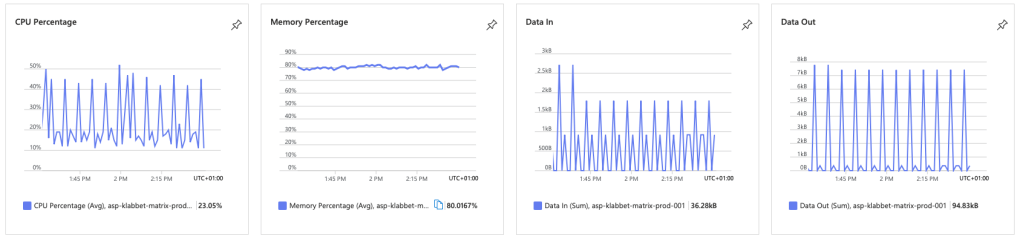
I only set up one compute and I think that is enough. This is the smallest (and cheapest) compute that you can get Matrix to run on. It will cost you about $35 per month.
resource appServicePlan 'Microsoft.Web/serverfarms@2025-03-01' = {
  name: 'asp-klabbet-matrix-prod-001'
  location: resourceGroup().location
  tags: resourceGroup().tags
  sku: {
    name: 'B1'
    tier: 'Basic'
    capacity: 1
  }
  kind: 'linux'
  properties: {
    // must be true if linux
    reserved: true
  }
}
I actually never found any issues with running on this compute. Matrix does eat up a lot of resources, but the service never felt sluggish. Instead I was surprised with how responsive it was.
App Service
I setup Synapse, MAS and Element Web as App Services on the same App Service Plan. I will only show Synapse here, they are pretty much identical. If you want to see all of it, go to the Github repository and read the code.
resource appService 'Microsoft.Web/sites@2025-03-01' = {
  name: 'as-klabbet-matrixsynapse-prod-001'
  location: resourceGroup().location
  tags: resourceGroup().tags
  properties: {
    serverFarmId: appServicePlan.id
    httpsOnly: true
    siteConfig: {
      alwaysOn: true
      linuxFxVersion: 'DOCKER|matrixdotorg/synapse:latest'
      ftpsState: 'Disabled'
      appSettings: [
        {
          name: 'DOCKER_ENABLE_CI'
          value: 'true'
        }
        {
          name: 'WEBSITES_PORT'
          value: '8008'
        }
      ]
      azureStorageAccounts: {
        'synapse-data': {
          type: 'AzureFiles'
          accountName: stor.name
          shareName: 'synapse-data'
          accessKey: stor.listKeys().keys[0].value
          mountPath: '/data'
        }
      }
    }
  }
}
In a production scenario you would not set docker container to latest version, but a specific version so you control when and how the service updates.
Here I connect the storage account to the docker container on the /data mount path. When Synapse starts it will go to this file service and look for homeserver.yaml for its configuration.
I also set up managed certificate and domain name for each app service. Go to the repo if you want to know how I did that.
Configuration
Once you have all the services up and running you need to configure both Synapse and MAS. You create configuration files that you drop in each file service where they are read during startup.
Synapse
You start by generating a basic configuration file by invoking the Docker container.
docker run -it --rm \
    --mount type=volume,src=synapse-data,dst=/data \
    -e SYNAPSE_SERVER_NAME=matrix.klabbet.dev \
    -e SYNAPSE_REPORT_STATS=yes \
    matrixdotorg/synapse:latest generate
Then you need to update the configuration file and upload it to the file service where the app can read it. It should be called homeserver.yaml.
server_name: "matrix.klabbet.dev"
public_baseurl: "https://synapse.matrix.klabbet.dev/"
serve_server_wellknown: true
pid_file: /data/homeserver.pid
enable_login: true
admins:
  - "@mikael:matrix.klabbet.dev"
listeners:
  - port: 8008
    tls: false
    type: http
    x_forwarded: true
    bind_addresses: ['0.0.0.0']
    resources:
      - names: [client, federation]
        compress: false
database:
  name: psycopg2
  args:
    user: <dbusername>
    password: <dbpassword>
    database: synapse
    host: pgsql-klabbet-matrix-prod-001.postgres.database.azure.com
    port: 5432
    cp_min: 5
    cp_max: 10
  allow_unsafe_locale: true
log_config: "/data/matrix.klabbet.dev.log.config"
media_store_path: /data/media_store
registration_shared_secret:
report_stats: false
macaroon_secret_key:
form_secret:
signing_key_path: "/data/matrix.klabbet.dev.signing.key"
trusted_key_servers:
  - server_name: "matrix.org"
matrix_authentication_service:
  enabled: true
  endpoint: https://auth.matrix.klabbet.dev/
  secret:
There are some parts here that aren’t standard. In order to get the database working with Azure Database for PostgreSQL you need to include allow_unsafe_locale: true.
Matrix Authentication Service (MAS)
You also need to generate a configuration file for MAS.
docker run ghcr.io/element-hq/matrix-authentication-service config generate > config.yaml
You get a configuration file very much like this.
http:
  listeners:
  - name: web
    resources:
    - name: discovery
    - name: human
    - name: oauth
    - name: compat
    - name: graphql
    - name: assets
    binds:
    - address: '[::]:8080'
    proxy_protocol: false
  - name: internal
    resources:
    - name: health
    binds:
    - host: localhost
      port: 8081
    proxy_protocol: false
  trusted_proxies:
  - 192.168.0.0/16
  - 172.16.0.0/12
  - 10.0.0.0/10
  - 127.0.0.1/8
  - fd00::/8
  - ::1/128
  public_base: https://auth.matrix.klabbet.dev/
  issuer: https://auth.matrix.klabbet.dev/
database:
  host: pgsql-klabbet-matrix-prod-001.postgres.database.azure.com
  port: 5432
  username: <dbusername>
  password: <dbpassword>
  database: mas
  max_connections: 10
  min_connections: 0
  connect_timeout: 30
  idle_timeout: 600
  max_lifetime: 1800
email:
  from: '"Authentication Service" <root@localhost>'
  reply_to: '"Authentication Service" <root@localhost>'
  transport: blackhole
secrets:
  encryption: <encryptionsecret>
  keys:
  - key:
  - key:
  - key:
  - key:
passwords:
  enabled: true
  schemes:
  - version: 1
    algorithm: argon2id
  minimum_complexity: 3
matrix:
  kind: synapse
  homeserver: matrix.klabbet.dev
  secret: <sharedsecret>
  endpoint: "https://synapse.matrix.klabbet.dev"
Unless you have an e-mail server you need to configure transport: blackhole. Then it is prefered if users need to register with their e-mail address. While setting up the server and the admin user you might need to have the following configuration
account:
  password_registration_enabled: true
  password_registration_email_required: false
It makes sure that you can create an account without e-mail.
Upload the file to the MAS file service and call it config.yml for MAS to find it.
Summary
Installing Matrix on an Azure App Service Plan might not have been the best idea I had, but it works! It actually works very well and it saves me money. Instead of paying $100 per month for running it on the cheapest Azure Kubernetes Service, I get away with $44.
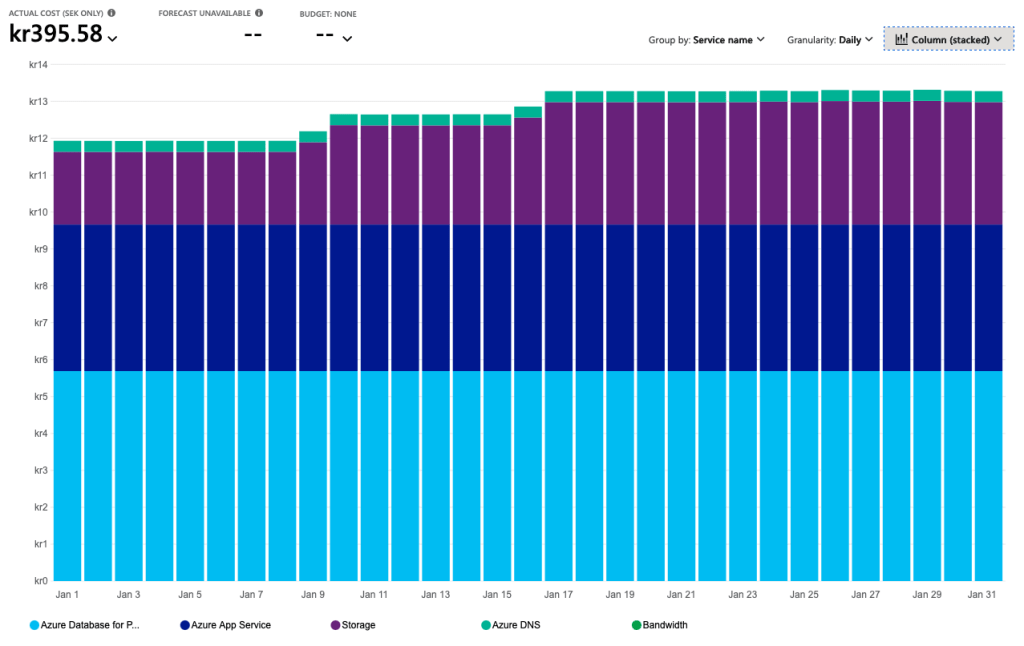
What I like about this setup is that costs will be quite flat. It will not really increase with time. After one week of active usage we managed to reach 12 MB on the database and 8 MB on the storage account. The database has 35GiB available and the Storage Account 100 TiB. It will take some time before we reach maximum capacity there ;D
This was a fun experiment. Things I would consider if doing this for a real production scenario
- Not running it in Azure if the idea is to be independent from tech giants 🤣
- Use Kubernetes as there are a more resources on getting it running on Kubernetes
- Use an nginx reverse proxy for ingress to avoid having different server name and host
- Install the Element Call as well for video conferencing
- Make better use of Azure Key Vault by adding secrets as environment variables populated by AKV
This article was written without the use of generative AI.








 Klabbet