Four of a Kind – Azure Certifications for Software Developers

I have finally collected all four Azure credentials that I’ve been seeking. This was my goal for the last 6 months, and I achieved it today 28 November 2025.

Let me tell you a bit on why it was important for me to get certified, and why I selected these four certifications.


An Azure certification is an important tool if you’re a contractor, because it acts as a credential when looking for contracts. For me as a freelance consultant, I don’t have a big firm validating my knowledge, but have to stand completely on my own merit. One way to get someone to vouch for you, is to take an Azure certification. That way, Microsoft vouch that I know these topics that I’m certified on.

If you’re not freelance like me, it can still be helpful to take a certification, to increase your value within the company. These certifications are counted towards the company’s Microsoft partner level, which comes with benefits. The certificates are also personal, so if you plan on looking for a new job, they are a merit in your job search and might land you a better offer.

I’ve chosen to take the following certificates

I will give you my view on why these certificates are the most important for a software developer on the Microsoft stack.

Azure Administrator Associate

As a software developer this is a really cool certification as it helps you learn the things that you don’t come in contact with very often, like setting up an Azure subscription from scratch, Azure networking and how to secure your solution in Azure.

Even if this certificate is more directed at IT Operations, it’s knowledge that’s also very useful to know as a software developer.

Azure Developer Associate

This certification is a must have if you’re writing software that is run on Azure. It helps you understand how to write cloud native solutions, by utilizing the features that are provided in Azure. I have so many times seen developers reinventing the wheel, when there’s already a native Azure solution for the same problem.

This certification will help you learn about all those features, so you don’t have to implement them yourself.

Azure Solutions Architect Expert

If you are going to be consulting on Azure, you need to get this certification. It will help you get a grip on all the service offerings on Azure. You will get the birds eye view on governance, security and how Microsoft intends Azure to be used in an enterprise setting.

After completing this certification you will see Azure as a set of puzzle pieces and know how to fit them together into a working system.

DevOps Engineer Expert

This last certification, that I completed today, teaches you how to deliver software in a cloud environment. How can you shorten the cycle time, and at the same time increase quality and security in your software delivery pipeline.


Once you have these four certifications, you have a pretty good grip on how to develop, deliver and host software in a Microsoft setting.

This article was written without AI.

My AZ-305 Designing Microsoft Azure Infrastructure Solutions Study Path

I’ve been talking for years about getting the Solution Architect credential, but I’ve never put aside the amount of time needed. This latter half of this year I’ve decided to take 20% of the time I usually spend on clients and spend it on myself instead, and the first goal was to take the AZ-305 exam.

Note: I cannot say anything about the exam itself, as you’re made to sign an NDA not to, but I can tell you about my study path and how I first failed, and then succeeded.

First Try

I failed my first try at this exam, and from what I’ve gathered, it’s not uncommon. I spent about 36 hours of study time in the first round, and I focused on the study path that Microsoft supply on their certificate page.

This study path does not represent the knowledge you’re being tested on. I failed because I studied the wrong things. I got 634 points out of 1000 where 700 is the passing limit.

After failing I did a short retrospective with myself on what went wrong, found new resources to study and set at it again for another 3 weeks of intensive studying. I can be quite stubborn when my mind is set on something.

Second Try

I spent about 40 hours on my second round of studies. First of all I bought the MeasureUp AZ-305 Practice Test and I did all of the 168 questions in 4 sittings. The way I did it was that for every question, I pasted it into Chat GPT and then we discussed every possible answer, why it was right or wrong. This way I used the test to find my knowledge gaps. It was also a great way to discover and remember the things I got wrong, instead of just skipping to the next question. It helped me to get a better understanding about topics I’m not familiar with.

The practice questions can be questionable, but the act of going through and discussing them was most useful to me.

This was a great use case for AI, even if Chat GPT wasn’t always right, it helped me remember as I had to reason about the knowledge. I find that much better than just reading.

I should say, the MeasureUp test has questions that are close to the real exam, but some of the questions are infuriating, and I did find some that were plain wrong. While this sounds bad, getting angry is also a good way of remembering what you try to study.

After identifying my knowledge gaps I did a couple of labs in Azure. I setup scenarios in my own Azure tenant, created resources and tried different things. This was very useful for resources and features that I don’t use myself in my day-to-day work.

  • Availability sets, creating virtual machines in sets, setting up Azure Load Balancer and testing fail-over
  • Availability zones, creating virtual machines in different zones
  • Virtual machine scale sets, setting up an autoscaling cluster of machines
  • Azure Site Recovery, setting up replication of a machine in a different region
  • Azure Backup, playing around with the different backup options
  • Azure SQL where I setup different configurations of single Azure SQL, DTU tier, vCore Tier, Elastic Pool and Managed Instance
  • Azure Policy and Initiatives, creating policies and applying them to my subscriptions

I wanted to play around more with Microsoft Entra ID, but most of the things I wanted to lab with requires a P2 license, like conditional access, access reviews, PIM and ID Protection.

Another thing I did was I watched John Savill’s study cram on YouTube. While it’s very high level and not detailed enough to pass the exam, I found that sometimes he was saying things I didn’t know about, so I went ahead and looked it up to learn about it. I watched this during my commute over a span of 3 weeks.

John Savill is the GOAT for making these study cram videos. I think it was good repetition of the basics before the exam.

The last thing I did was that I got the AZ-305 Exam ref from Amazon. First I thought it was a waste of money, because it would be delivered before the day of my exam, but it arrived early and I spent a couple of evenings reading it through.

While it doesn’t contain all the details you need to know, it’s still a very good and dense walkthrough of everything on a high level, and sometimes very detailed as well. I can recommend getting it if you’re struggling with the exam.

The exam ref has all the bullet points of what you need to know. Maybe not all the details, but it’ it’s a good starting point.

With all this studying I was much more confident on my second try and I finished with 844 points out of 1000 where 700 is the passing score.

Summary

I think this certificate was quite hard, the hardest yet. The reason for me saying so, is that in my previous certificates Administrator and Developer I’ve felt quite at home by using the technology in my daily job. In this certificate they test that you know much about all of Azure, not only the parts that you are comfortable with.

It took me about 80 hours of effective study time to learn everything I needed and I don’t think it’s something that anyone would pass without study. Everyone has their part of Azure they’re comfortable with, and this tests on the whole platform.

Now I have the Administrator, the Developer and the Solution Architect certifications. The only one left that I’m interested in is the DevOps certificate so I guess I’ll do that next.

App Service Plan Random Restarts

I’m hosting a real-time system that is very dependent on low latency throughput and I’m doing it on Azure. In hindsight this might not have been the best choice as you have no control over the PaaS services and only a shallow insight over the IaaS service that Azure offers. In hindsight, when you’re writing a real-time system, deploy it on an environment where you control everything.

Last week we were starting to get problems that the system would have these interruptions. Randomly it looked like the system would stop working for 1-2 minutes and then be back to normal. First we thought it was the network, but after diagnosis of the whole system, we found that the App Service Plan was restarting and this was causing the interruptions.

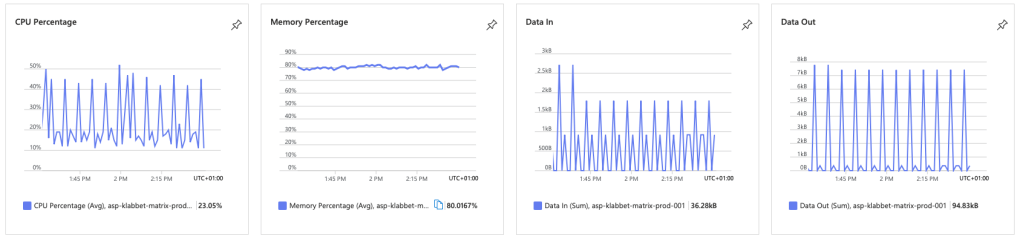
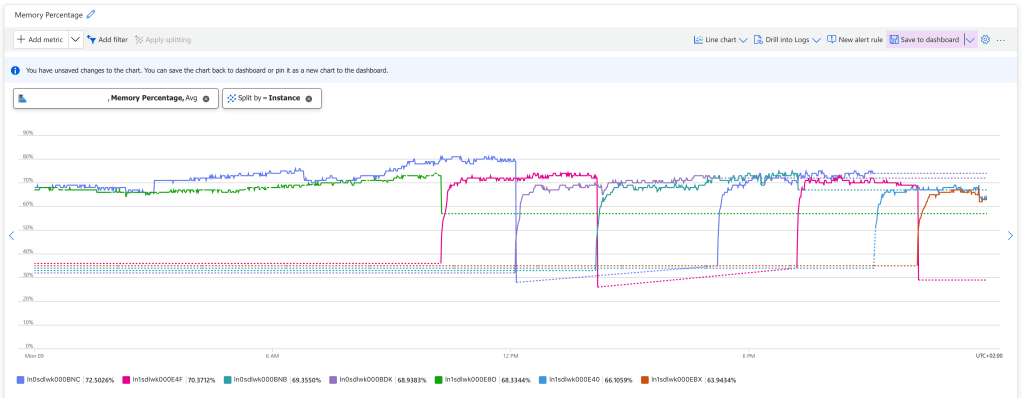
The memory graph shows when an instance drops, a new one is booting up.

There is no log of this, but you can see it if you watch the App Service Plan metrics, and split the Memory Percentage on instance. You can see that new instances starts up when old ones are killed. While the new instance is starting up, we drop connections and the real-time system stops working for 1-2 minutes.

In a normal system this wouldn’t be a problem, because all requests would move over to the instance that is being live, and the users wouldn’t be affected, but we’re working with web sockets and they cannot be load balanced like that. Once they’re established, they will need to be reconnected if the instance goes down.

So this was bad for us!

These kind of issues are hard to troubleshoot because Azure App Service Plan is PaaS. You don’t have access to all the logs needed, but I found this tool when you go into the Azure App Service and select Resource Health / Diagnose and solve problems and search for Web App Restarted.

There a lots of diagnose tools for Azure App Service if you know where to find them. This one shows web app restarts.

This confirms the issue but really doesn’t tell us why the instances are restarting. Asking Chat GPT for common reasons for App Service Instance restarts, I got the following list

  • App Crashes
  • Out of Memory
  • Application Initialization Failures
  • Scaling or App Service Plan Configuration
  • Health Check Failures
  • App Service Restarts (Scheduled or Manual)
  • Underlying Infrastructure Maintenance (by Azure)

The one that stood out to me was “Health Check Failures” so I went into the Health Check feature on my App Service and used “Troubleshoot” but it said everything was fine. So I checked the requests to my /health endpoint and it told a different story.

The health check is failing a couple of times per day and this seems to be the cause of the App Service instance restarts.

The health checks are fine 99.99% of the times, but those 0.01% flukes will cause the instance to be restarted. Azure App Service will consider that the instance is unhealthy and restart it.

To test my theory I turned off health checks on my Azure App Service, and the problem went away. After evaluating for 24 hours we had zero App Service Instance restarts.

When I turned off health checks on Azure App Service, to test my theory, the problems with the restarts disappeared.

The problem is confirmed, but why are health checks failing? Digging a little deeper I found the following error message

Result: Health check failed: Key Vault
Exception: System.Threading.Tasks.TaskCanceledException: A task was canceled.

In my health checks I check that the service has all the dependencies it needs to work. It cannot be healthy if Azure Key Vault is inaccessible. In this case Azure Key Vault would return an error 4 times during 24 hours, and this would cause the health check to fail and the instances to be rebooted.

Why would it fail? This is could be anything. Maybe Microsoft was making updates to Azure Key Vault. Maybe there was a short interruption to the network. It doesn’t really matter. What matters is that this check should not restart the App Service instances, because the restart is a bigger problem than Key Vault failing 4 checks out of 2880.

Liveness and Readiness

Health checks are a good thing. I wouldn’t want to run the service without them, but we cannot have them restarting the service every hour. So we need to fix this.

I know of the concept of liveness and readiness from working with Kubernetes. I don’t know if this is a Kubernetes thing, but that is where I learned the concept.

  • Liveness means that the service is up. It has started and are responding to essentially ping.
  • Readiness means that the service is ready to receive traffic

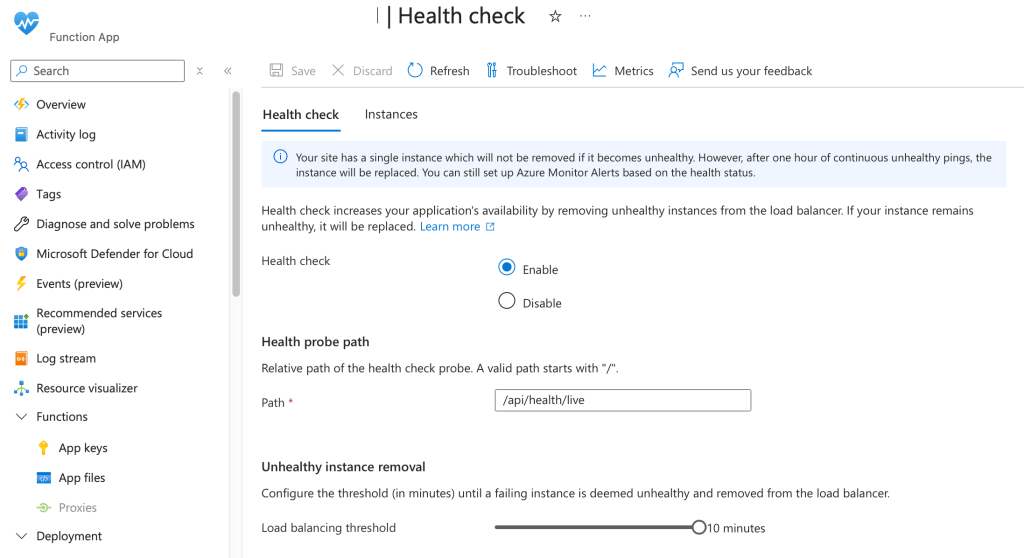
What we could do, is to split health checks into liveness checks and readiness checks. Liveness checks would just return 200 OK so that Azure App Service health checks have an endpoint for evaluating the service.

The readiness checks would do what my health checks do today, verify that the service has all the dependences required for it to work. I would connect my Availability Checks to the readiness so I get a monitor alarm if the service is not ready.

The health checks are using the new liveness endpoint that doesn’t verify the dependencies.
The availability check use the new ready endpoint to verify that all dependencies are up and running.

The type or namespace name ‘TableOutputAttribute’ could not be found

This compilation error was about to drive me crazy. I wanted to use the TableOutput attribute on my Azure Function, but I couldn’t figure out what package and using I needed.

StackOverflow is a mash of questions about Azure Functions in-process and isolated-process and at times there is a question for isolated-process and the answers are for in-process. It doesn’t help asking Copilot because it cannot figure it out either.

Apparently, Microsoft.Azure.Functions.Worker.Extensions.Storage used to have this attribute, but they have separated Azure Blobs, Queues and Tables into separate extensions since version 5.0.0.

So if you want to use TableOutput, you need to reference Microsoft.Azure.Functions.Worker.Extensions.Tables and after that you don’t really need any other using than

using Microsoft.Azure.Functions.Worker.Extensions;

Monitoring Dead-Letter Messages on Azure Service Bus

A weird limitation of the Azure Service Bus is the monitoring capabilities. It doesn’t seem to be connected to Log Analytics at all, and the few metrics you can get from Azure Portal are very coarse.

You can only monitor the total amount of dead-lettered messages in a whole queue or topic.

I’m getting a steady stream of dead-lettered messages in my application, and it’s not useful for me setting a boundary as I would need to increase it ever so often, but I do want an alert if the rate of dead-lettered messages accelerates. How would I do that?

First you need to get the metrics into Log Analytics so that you can run queries and projections on it. One way to do this is to create an Azure Function that will check your metrics at intervals and write them to Application Insights. Here’s an example.

public class TimerServiceBusMonitorFunction
{
    private readonly ILogger _logger;
    private readonly TelemetryClient _telemetryClient;
    private readonly ServiceBusAdministrationClient _serviceBusAdministrationClient;

    public TimerServiceBusMonitorFunction(ILogger<TimerServiceBusMonitorFunction> logger, TelemetryClient telemetryClient, ServiceBusAdministrationClient serviceBusAdministrationClient)
    {
        _logger = logger;
        _telemetryClient = telemetryClient;
        _serviceBusAdministrationClient = serviceBusAdministrationClient;
    }

    [Function("TimerServiceBusMonitor")]
    // trigger every minute
    public async Task Run([TimerTrigger("0 */1 * * * *")] object timerDeadLettersMonitor,
        CancellationToken cancellationToken = default
        )
    {
        _logger.LogInformation("START TimerServiceBusMonitor");

        // get all topics
        var topics = _serviceBusAdministrationClient.GetTopicsAsync(cancellationToken);

        await foreach (var topic in topics)
        {
            _logger.LogDebug("Get subscriptions for topic {topic}", topic.Name);

            // get the subscriptions
            var subscriptionsProperties = _serviceBusAdministrationClient.GetSubscriptionsRuntimePropertiesAsync(topic.Name, cancellationToken);

            await foreach (var subscriptionProperties in subscriptionsProperties)
            {
                _logger.LogDebug("Report metrics for subscription {subscription}", subscriptionProperties.SubscriptionName);

                _telemetryClient.TrackMetric("Mgmt.ServiceBus.DeadLetters", subscriptionProperties.DeadLetterMessageCount, new Dictionary<string, string> {
                    { "Topic", topic.Name },
                    { "Subscription", subscriptionProperties.SubscriptionName }
                });

                _telemetryClient.TrackMetric("Mgmt.ServiceBus.ActiveMessageCount", subscriptionProperties.ActiveMessageCount, new Dictionary<string, string> {
                    { "Topic", topic.Name },
                    { "Subscription", subscriptionProperties.SubscriptionName }
                });

                _telemetryClient.TrackMetric("Mgmt.ServiceBus.TotalMessageCount", subscriptionProperties.TotalMessageCount, new Dictionary<string, string> {
                    { "Topic", topic.Name },
                    { "Subscription", subscriptionProperties.SubscriptionName }
                });
            }
        }

        _logger.LogInformation("STOP TimerServiceBusMonitor");
    }
}

This function has a dependency to ServiceBusAdministrationClient which I setup in my Program.cs like this.

var host = new HostBuilder()
    .ConfigureFunctionsWorkerDefaults()
    .ConfigureServices(services => {
        services.AddAzureClients(cfg => {

            // get name of the service bus from environment variable
            var serviceBusName = Environment.GetEnvironmentVariable("SERVICE_BUS_NAME")
                ?? throw new InvalidOperationException("Missing configuration SERVICE_BUS_NAME required.");
            
            // get the user identity client id from environment variable, if it is not set, use the default azure credential
            var userIdentityClientID = Environment.GetEnvironmentVariable("SERVICE_BUS_USER_MANAGED_IDENTITY_ID");

            // add service bus administration client
            cfg.AddServiceBusAdministrationClientWithNamespace($"{serviceBusName}.servicebus.windows.net")
                .WithCredential(string.IsNullOrEmpty(userIdentityClientID) ? new DefaultAzureCredential() : new ManagedIdentityCredential(userIdentityClientID));
        });
    })
    .Build();

host.Run();

Once deployed to your environment this function will start tracking the metrics of your service bus every minute. In order to get how many dead letters are created every 5 minutes, I have written the following Kusto query.

customMetrics
| where name == 'Mgmt.ServiceBus.DeadLetters'
| extend Subscription = tostring(customDimensions.Subscription)
| extend Topic = tostring(customDimensions.Topic)
| order by timestamp asc
| summarize StartValue = min(value),
            EndValue = max(value) by Topic, Subscription, bin(timestamp, 10m)
| extend AverageRateOfChange = (EndValue - StartValue)
| project Subscription, timestamp, AverageRateOfChange

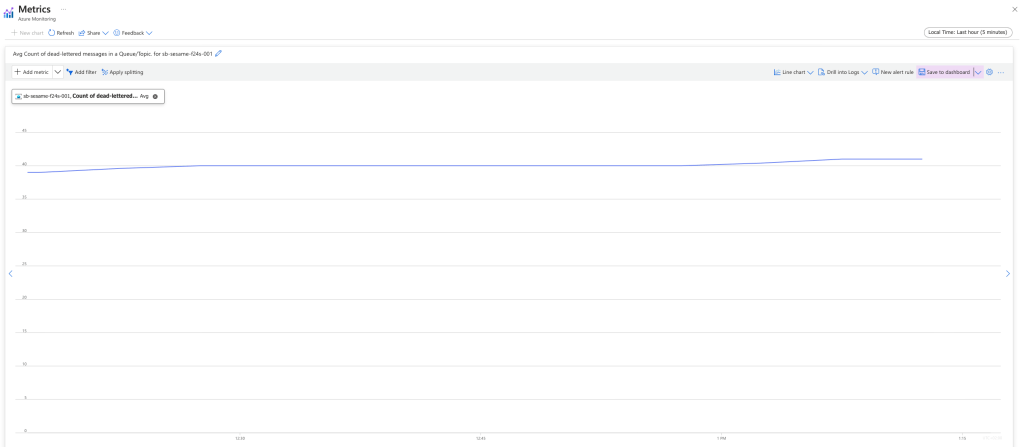
With this I get the following graph, and the ability to set an alert if the application generates dead letters above my threshold.

Instead of the built in graph of how many messages there are in a topic, we can now get a graph on how many messages are added to a subscription. This is useful for monitoring the rate of dead lettered messages.

What’s a devContainer and what is it good for?

This is supposed to become a series of three parts, so I’m writing down the titles of the next parts here to incentivise me to write them

  1. What’s a devContainer and what is it good for?
  2. How to setup a devContainer with Visual Studio Code
  3. Remote development with devContainers

This first article is an introduction to devContainers.

What is a devContainer?

You’ve probably heard about Docker containers and how you can package an application with the operating system to make it run on any hardware.

A devContainer is exactly that but for development environments. You write code, run and debug it inside a Docker container. The devContainer has all the tools you’ll need for your development, Git, dotnet, nodejs, you name it.

What problems does it solve?

Have you ever tried to onboard a new developer to the project and spent a day trying to get the development environment to run on his/hers machine? Was it the wrong version of nodejs installed or did they miss a Windows update?

A devContainer solves this by installing the correct versions of all dependencies from the Dockerfile.

Have you developed an application using the latest technologies, .NET 5 and then a year later when you are just going to fix an issue the application no longer builds because you have .NET 6 installed on your machine and there were some breaking changes between versions?

With devContainers you will stay on .NET 5 until _you_ decide it is time to upgrade the code base. The application will not stop working because you switched machines or the tools got outdated.

Have you ever had your development environment stop working because you share database with the team and someone else ran a database migration that you haven’t got yet?

With devContainers it is easy to setup dependencies like databases in the same Docker instance so everyone on the team has their own local database without any messy installations.

What applications can be devContained?

All applications that are targets for Docker could be using devContainers for development

  • Webservices
  • API’s
  • Databases
  • Expo Apps

Applications that doesn’t work as well with devContainers are Desktop, iOS and Android applications.

What tools are required?

The definition for a devContainer is written in a file called .devcontainer/devcontainer.json. This is usually accompanied with a Dockerfile or docker-compose.yml and various setup scripts.

In order to run the devContainer on your local machine you need to have Docker Desktop 2.0+ setup.

Visual Studio Code has the best integration with devContainers as of yet, and you’ll hardly notice that you’re working inside a Docker container.

Okay, but isn’t it weird?

No, you will hardly notice that you’re working inside a Docker container.

  • A Docker container is not a virtual machine. There is almost no performance penalties of working inside a Docker container.
  • The source tree is shared between the host and the container, so you can work with your code files just as normal.
  • Git credentials are automatically forwarded to the container so you do not need any extra authentication for your devContainer.
  • When starting your application inside a container, vscode will automatically forward the port to the host so you can see the result on your machine. Just open a web browser to localhost:5000 as you usually do and it works like magic.

This was a short introduction to devContainers. Setting one up for your project is very easy and what we’re going to look at in part 2.

Refactor Your Wetware

I’m running a book club with a group of people, where we read one book every sixth months. The group is a bunch of people all working with software some way or the other. The books that we’ve read have been very management oriented but this time around we got around reading on the topic of self improvement.

Book cover page, Pragmatic Thinking & Learning - Refactor Your Wetware by Andy Hunt

This book wants you to become aware of how you think, what you think and why you think the way that you do. It also provides a couple of tools to help you think deliberately.

Andy describes a model of thinking where he split the brain into the L-mode and the R-mode, with a shared bus in between. The L-mode is the active thinking you do when you concentrate and R-mode is the background thinking you do when you shut down L-mode. The shared bus means that you can only use L-mode or R-mode, but never both at the same time. Some problems, like pattern matching is easier to do with the R-mode, but in order to engage that line of thinking you need to stop focusing. This is why you solve problems while walking the dog, taking a shower or sleeping. You turn L-mode off and let R-mode do the pattern matching needed to solve a particular problem.

It is just a model and I wouldn’t say that anyone knows if this is the way our brain works, but it does map into my own experience with taking a walk over lunch time to find new perspectives on what I’ve been working on up to that point.

The book continues to build on this model and introduce you to biases and bugs in your brain. It provides tools to be able to alter your thinking and find new ways to think and to learn.

I thought this was a useful book and I would recommend it to you if you’re interested in thinking about thinking.

My takeaways from Øredev 2022

I went to Øredev this year and found old friends from before the pandemic, new insights from a bunch of talented speakers, and a newfound fear of what has happened to the world the last three years and of what technology is threaten to make of this world.

This year’s Øredev had a Alice in Wonderland theme

An overall theme this year was IT security. I don’t know if this was intended or a side effect that many of the invited partners were in the cybersecurity space, but also the keynotes focused a lot on security. Maybe the organisers chose this path because of the instability in Europe and the Russian war in Ukraine.

Renata Salecl did a really scary session on how social media is being used by governments against us, to make us insecure in truths and facts, and to make us apathetic to who is in control and what the person in power is actually doing. Our new behaviour is that we simply don’t care anymore.

Jenny Radcliffe followed this up with talking about her experiences in breaking security protocols of companies and Emily Gorcenski showed us how technology is used to drive revolutions and how its being weaponised in the Russian war in Ukraine.

In the same vein Runa Sandvik closed the conference in telling us about all the threats happening to journalists today and how to protect them from everyone wanting to do them hard. It is not hard to draw parallels between the increasing distrust of facts, the threat situation to journalists and the dismantling of democracy.

It is a grim world that Øredev presents to us.

Melvin Kranzberg, Technology is neither good nor bad; nor is it neutral from Cennydd Bowles talk on The Ethical Engineer

Between all the security sessions there were some developer focused ones as well. One really interesting one was how to use visualisation of state machines to make really complex app logic easier to understand. I’m sure we all have seen code that is just really hard to get your head around because it is jumping between different states. David Khourshid presented a tool called xstate which not only help you simplify the code around state machines, but also allow for visualisation. Pretty neat!

Define your state machine in a simple graphical interface and then copy the code into your code editor to implement the individual steps. Really cool visualisation from David Khourshids talk, Coding Complex App Logic Visually

I went to a couple of data sessions where I found out that data application development still is several years behind backend development but there is hope. Rob Richardson showed us how to do a database devops pipeline so we actually can version changes to the database, deploy continuously and test the deploys in an isolated container.

On the same theme Kjetil Klaussen talked about how they built a data platform in 6 months to keep track of salmon “production”. Seeing the pens where they keep thousands of salmons makes me a bit nauseous, but the idea of building a team and a data platform in just 6 months is really cool.

Before I start describing every single talk that I attended I will just give you my action points that I jotted down

  • A public employee handbook like the one from Gitlab is a really cool idea and if I’ll become leader of a company with more employees than myself, that is something that I would like to try
  • I need to improve my terms and conditions with ethical considerations so I can cancel a contract when a client ask me to do something I consider unethical
  • Everyone on a developer team should be considered a volunteer (even if we pay them to be there), and we need to make sure they are happy, stimulated and appreciated
  • I need to write some proof of concept application for gRPC, as it will become standard for communicating between micro services on the backend
  • Stop having hybrid retrospectives where some are remote and others are in the same room. It puts the participants on unequal footing. Also make sure you have thinking time in retrospectives so both active thinkers and reflective thinkers may contribute
  • Flutter is new, hot and interesting technology but there is not a big enough reason for me to invest in the technology. React Native, which I already know, is more mature and I would get a higher return of learning native iOS or Android development
  • Create a personal user manual for what people need to know about me to support working together. Things like “I prefer schedule a call instead of spontaneous calls” or “I do not like being praised in public” are things to go into that personal user manual
  • I need to learn more about Web 3.0 (not Web3). Web3 will probably not go away, even if I prefer it too, but I think that the idea of owning your own data in Web 3.0 is a compelling one

Next week we”ll get access to the recordings. There are several sessions I know I should’ve prioritised instead of the ones that I chose.

Developing Solutions for Microsoft Azure

Today I passed my AZ-204: Developing Solutions for Microsoft Azure exam and became an Azure Developer Associate. I’ve done some certifications in my days, but this was by far the hardest. The breadth of the knowledge required, Azure SDKs, data storage, data connections, APIs, authentication, authorisation, compute, containers, deployment performance and monitoring – combined with the extreme details in the questions, made this really hard. I didn’t think that I passed until I got my result.

These were the kind of questions that were asked

  • Case studies: Read up on a case study and answer questions on how to solve the client’s particular problems with Azure services. Questions like, what storage technology is appropriate, what service tier should you recommend, and such.
  • Many questions about the capabilities of different services. Like, what event passing service should you use if you need guaranteed FIFO (first-in, first-out)
  • How to setup a particular scenario. Like what order you should create services in order to solve the problem at hand. Some of these questions where down to CLI commands, so make sure that you’ve dipped your toes into Azure CLI.
  • Code questions where you need to fill in the blanks on how to connect and send messages on a service bus, or provision a set of services with an ARM template. You also get code questions where you should answer questions about the result of the code.

Because of the huge area of expertise and the extreme details of the questions, I don’t think you could study and pass the exam without hands-on development experience. If I were to give advice on what to study it would be

  • Go through the Online – Free preparation material. Make sure you remember the capabilities of each service, how they differentiate, and what features higher pricing tiers enables. Those questions are guaranteed.
  • Do some exercises on connecting Azure Functions, blob storage, service bus, queue storage, event grid and event hub. These were central in the exam.
  • Make sure you know how to manage authorisation to services like blob storage and the benefits of the different ways to do it. Know your Azure KeyVault as the security questions emphasise on this.

Be prepared that it is much harder than AZ-900: Microsoft Azure Fundamentals, go slow and use up all the time that you get. Good Luck!

Product Ownership

Any pair of programmers can write some code in a garage, but once that code ships to real users you have a product, and that’s a different thing entirely.

No matter if you’re a software vendor or a packaging manufacturer building software to support your business, that software needs support, change management, hosting, integrations and documentation. “Just build it!” is often too easily said. Once it is built, you will have that software in your IT landscape for years to come.

Hiring a product owner will help you with the following things

  • Setting a vision your product should achieve
  • Drive change in the product with a team of developers
  • Collect requirements from users and stakeholders
  • Help users and stakeholders understand your product’s brilliance

Maybe you don’t need a product owner for every VBA script written in Excel, but any system with sufficient amount of users should have a product owner.

Here are some of the qualities I find important in a product owner

  • An excellent communicator to gather requirements and communicate plans
  • An ambassador that will make people interested in your product
  • Comfortable with drawing up plans and executing on them
  • A source of great values from where the team can inherit their culture
  • An internal marketer to make sure the product has continued funding

The product owner doesn’t need to be a tech wizard. Its much more important to get a good in-house marketer for your product.