
| Date | Version | Changes |
|---|---|---|
| 2025-10-17 | v1.2.0 | Moved to Confluence |
| 2022-01-28 | v1.1.0 | Removed Urgency, Impact and Priority from this workflow as it is more suitable in the Incident Response Workflow. |
| 2022-01-20 | v1.0.0 |
This workflow describes how to handle problem reports. Support issues that fall under problem reports are
- Malfunctioning functionality
- Bugs
- Cosmetic defects
Please see other workflows for service request and change requests.
Key Performance Indicators
- Time lapsed in Waiting
- Time lapsed to Completed
- Proportion of Resolved Issues
- Time in Working
The Workflow
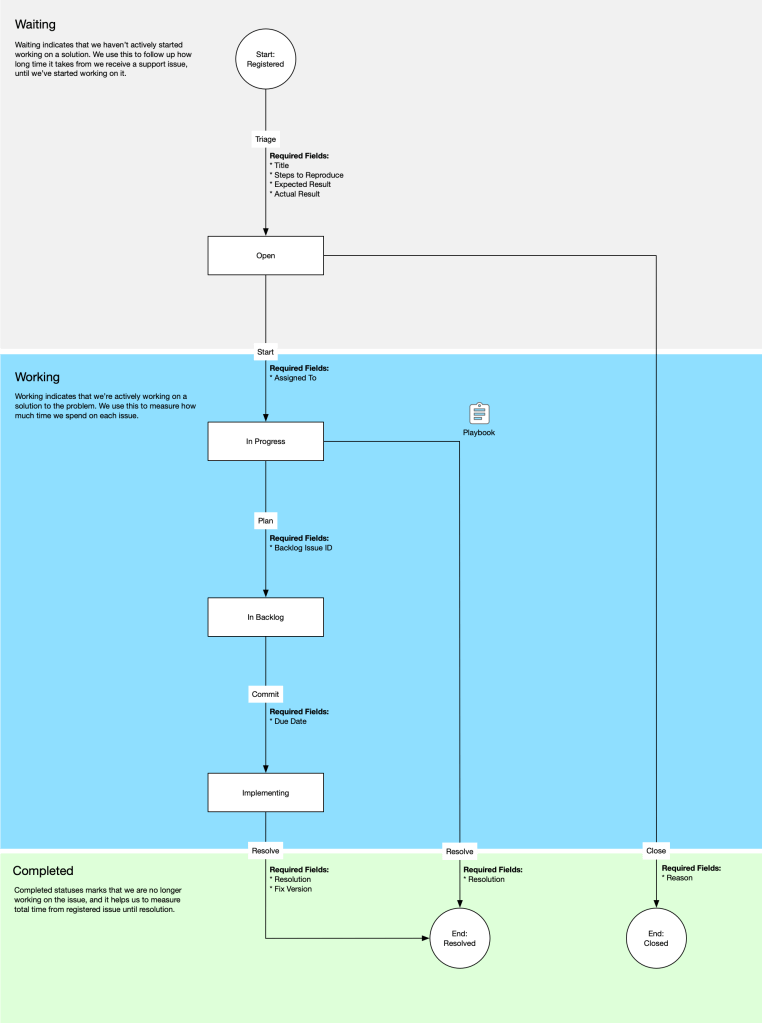
Problem Report Workflow focuses on simplicity while maintaining a high amount of Flow.
These are the statuses.
| Status | Description | Transitions |
|---|---|---|
| Registered | Issue has been created by reporter. | Triage |
| Open | Issue has been triaged and is waiting to be handled. | Start, Close |
| In Progress | A technician is using the Playbook to try to resolve the issue. | Plan, Resolve |
| In Backlog | The issue requires development and has been added to the backlog. | Commit |
| Implementing | The issue is in development. | Resolve |
| Resolved | The issue has been resolved. | |
| Closed | The issue has been closed. |
These are the transitions
| Transition | Description | Fields |
|---|---|---|
| Triage | Verify that the issue has required information and a clear description. Verify that the issue doesn’t belong to another workflow. | Title, Steps to Reproduce, Expected Result, Actual Result |
| Start | Assign the issue to a person and start working on the resolution. | Assigned To |
| Plan | Adding issue to the development backlog. | Backlog Issue ID |
| Commit | Starting development of the issue and set a due date. | Due Date |
| Resolve | The issue is solved. A resolution is posted back to the reporter, and fix version if the issue resolution required development. | Resolution, Fix Version |
| Close | The issue is being closed. The reasons posted back to the reporter. | Reason |
 Klabbet