
| Date | Version | Changes |
|---|---|---|
| 2022-01-28 | v1.0.0 | |
| 2025-10-17 | v1.1.0 | Moved from Confluence |
This workflow describes how to handle incidents. Support issues that fall under incidents are
- The system is not responding
- Users cannot perform their jobs to be done
- Business is loosing money because of a system error
An incident can be changed to another issue type, if the problem is not at least High priority.
An incident MUST be judged by its urgency and impact during triage. Urgency is a measure of time for an incident to significantly impact the business.
| Urgency | Definition |
|---|---|
| Highest | The incident is at this moment causing significant loss of income, and severely impacting the business. |
| High | The incident is causing loss of income that is expecting to increase unless the service is restored. |
| Medium | The incident impacts the business with loss of income until the service is restored. |
| Low | The incident will impact the business with loss of income unless the service is restored. |
| Lowest | The incident might impact the business with loss of income unless the service is restored. |
Impact measures the effect of an incident on the business processes.
| Impact | Definition |
|---|---|
| Expensive / Widespread | The incident is a complete black-out of the Service, or a major part of the service. |
| Significant / Large | The Service is mostly working, but with reduced performance and reliability. |
| Moderate / Limited | An important part of the Service is not working, or working unreliably. |
| Minor / Localised | A minor part of the Service is not working or performing as it should. |
Once Urgency and Impact are established the priority of the issue will be set according to the following matrix. This is a table that should be in the service license agreement.
| URGENCY → | Highest | High | Medium | Low | Lowest |
|---|---|---|---|---|---|
| IMPACT ↓ | |||||
| Extensive / Widespread | Higest priority | High priority | Medium priority | Low priority | Lowest priority |
| Significant / Large | Highest priority | High priority | Medium priority | Low priority | Lowest priority |
| Moderate / Limited | Medium priority | Medium priority | Low priority | Lowest priority | Lowest priority |
| Minor / Localized | Low priority | Low priority | Lowest priority | Lowest priority | Lowest priority |
The priority of the incident concludes how fast the incident should be concluded. Usually incidents of priority medium or lower will be change to problem reports and managed in line of business.
Key Performance Indicators
- Time lapsed in Waiting
- Time lapsed to Completed
- Proportion of Resolved Issues
- Time in Working
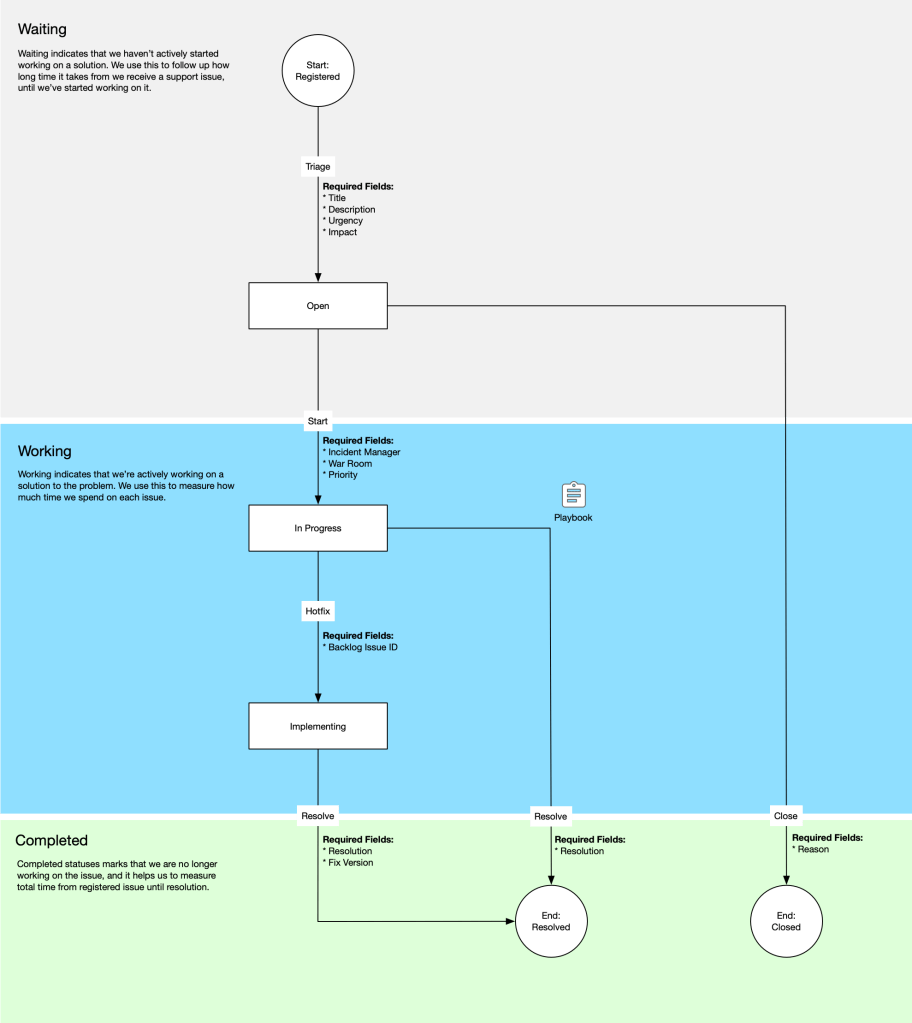
The Workflow
The Incident Response Workflow focuses on simplicity while maintaining ha high amount of flow.
These are the statuses
| Status | Description | Transitions |
|---|---|---|
| Registered | Issue has been created by reporter. | Triage |
| Open | Issue has been triaged and is waiting to be handled. | Start, Close |
| In Progress | A technician is using the Playbook to try to resolve the issue. | Hotfix, Resolve |
| Implementing | A hot fix is in implementation. | Resolve |
| Resolved | The issue has been resolved. | |
| Closed | The issue has been closed. |
These are the transitions
| Transition | Description | Fields |
|---|---|---|
| Triage | Verify that the issue has required information and a clear description. Verify that the issue doesn’t belong to another workflow.Urgency and Impact are established. | Title, Description, Urgency, Impact |
| Start | Priority of the incident deems that it mush be managed right away.An incident manager is assigned to the incident, a digital war room is initiated. | Incident Manager, War Room, Priority |
| Hotfix | The issue cannot be solved by the scenarios in the playbook. An hot fix must be applied. | Backlog Issue ID |
| Resolve | The issue is solved. A resolution is posted back to the reporter, and fix version if the issue resolution required development. | Resolution, Fix Version |
| Close | The issue is being closed. The reasons posted back to the reporter. | Reason |
An incident should always be followed by a post mortem and implementation of improvements, to reduce the number of incidents in the future, but that is outside the scope of the incident response workflow.
 Klabbet